
API
Overview
This page describes all the Payonic API's, which are processed strictly from the merchant to Payonic. These API calls does not include envolvement from the cardholder.
Communication to the Payonic API is made using REST. REST (Representational State Transfer) is an architectural style and set of principles for designing networked applications. It's commonly used in the context of building web services and APIs. REST is based on a few key principles that emphasize simplicity, scalability, and the use of standard web technologies.
Functions
Below is as list of the functions available for the Payonic API.
- MIT authorization. A payment made on behalf of stored payment details (incremental authorization, scheduled payment, unscheduled payment).
Response is async via notification. - Void. To cancel an uncaptured payment.
Response is async via notification. - Capture. To capture a new created payment.
Response is async via notification. - Refund. To make refunds of existing captured payments.
Response is async via notification. - Payout. To make payouts to customers. (e.g. gambling).
Notice that the response for this API call is sync meaning the response is returned directly on the requesting socket. - Health. Get healt data from the Payonic API's. The response is sync meaning the response is returned directly on the requesting socket.
- Payment. Get details about a payment.
Response is async via notification. - Life cycle management. Get notified upon updates from the card issuer.
Response is async via notification as this is initiated by card issuer.
Flow
The Payonic API is designed to process huge amount of payment operations. Therefore, All API flows are processed in the same asynchronously way. This voids lack of performance issues and bottle-necks in the flow. The illustration below shows how data from merchant to Payonic and back again flows. This
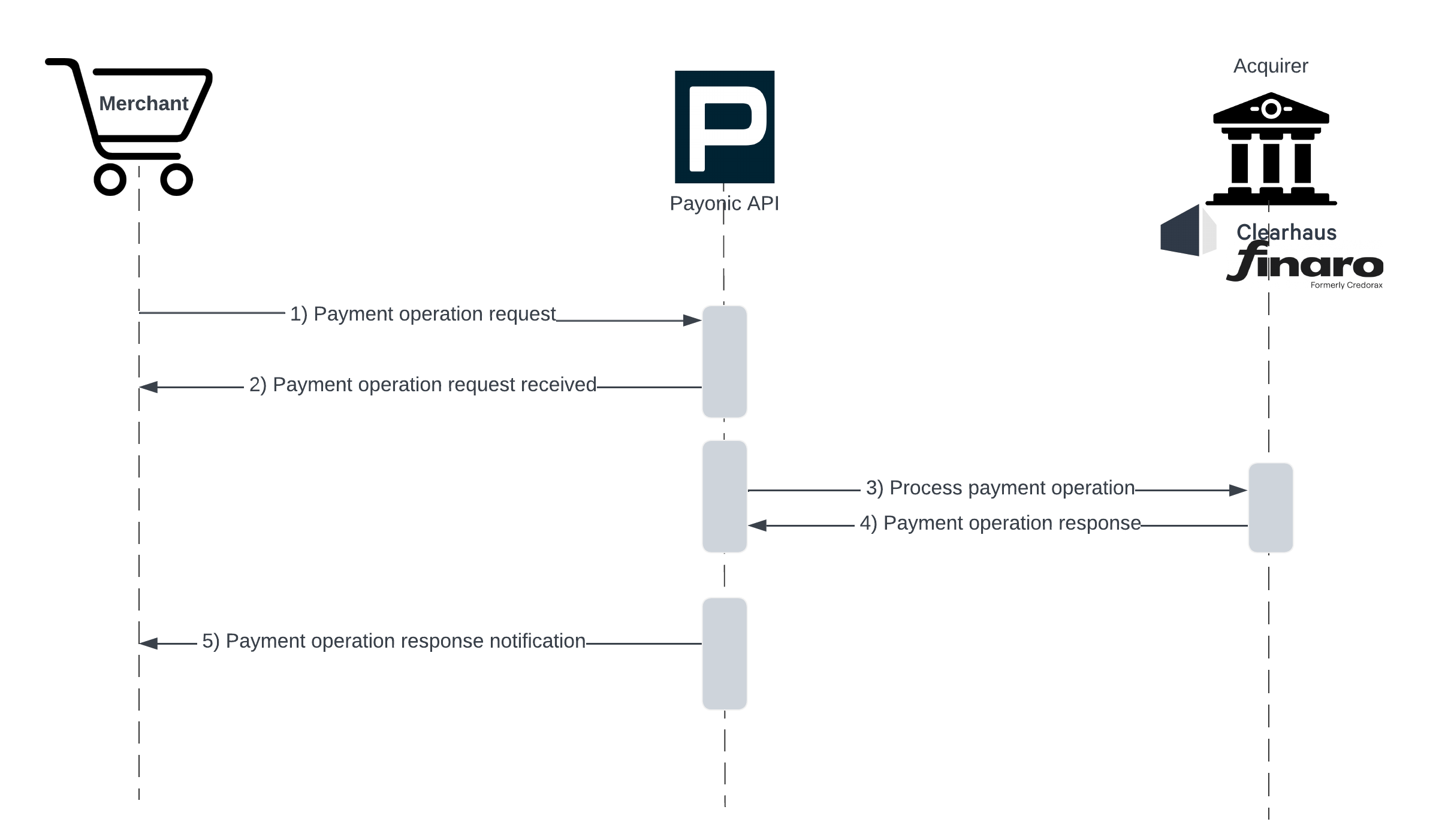
| #1 | The merchant initiates an operation by requesting the Paynic API to perform an operation. |
|---|---|
| #2 | Payonic replies immidiately to the merchant that the operation has been requested. As return the merchant receives an unique response identifier (responseid). |
| #3 | Payonic processes the payment operation by calling the connected processor / acquirer. |
| #4 | When the connected processor / acquirer is completed processing the payment operation the response is returned to Payonic. |
| #5 | When the response from the processor / acquirer is receieved Payonic will notify the merchant asynchronously by a HTTP POST request including JSON payload to deliver the response for the original payment operation request. |
Auhentication
To auhenticate the Payonic API an API-key will be rquired. This API-key can be fetched from within the Payonic back-office from the menu "Settings" -> "API-key".
The API key is then required in all API requests by setting the API-key header Authorization to the value Basic API-key. Below is an example on how to call the API to get details about a payment with id 4f27f22d644e4aaebbb92b70316278f0 using cURL with API-key "1234567890ABC":
curl https://api.payment.payonic.com/payment/abcdefg -H "Authorization: Basic 1234567890ABC"
Trace header
To trace each API request a simple header can be added to each individual request. The header is named TraceApi and must be set to an unique value (UUID). When both client and server stores this unique reference quick debugging is enabled.
Below is an example of how this header is set using cURL:
curl https://api.payonic.payonic.com/payment/abcdefg -H "TraceApi: e018fdfb5bda40e4a7e91759c22922fd"
MIT authorization
A MIT authorization initiated by a merchant on behalf of a customer, using existing card holder data stored in the system.
The end-point of the API call is: https://api.mit.payonic.com/api/mit
Request:
{
	"merchantid": "4f4e2451482d441ead8e2862369727d0",
	"paymentid": "168c4ef2f6d046029d72fd318d844f55",
	"merchantpaymentid": "4f4e2451482d441ead8e2862369727d0",
	"amount": 1095,
	"currency": "DKK",
	"reference": "order-12345",
	"paymenttype": "unscheduled",
	"processor": "finaro",
	"textonstatement": "cardtokens.io order-12345",
	"note": "this is a simple note added to the payment",
	"tags": "taga tagb tagc",
	"customer":
	{
		"email": "don.johnson.miami-vice@payonic.com",
		"firstname": "Don",
		"surename": "Johnson",
		"ipaddress": "127.0.0.1",
	},
	"notificationurl": "https://www.payonic.com/mitauthorization",
}
| Name | Description | Type | Pattern |
|---|---|---|---|
| merchantid | |||
| paymentid | |||
| merchantpaymentid | |||
| amount | The amount of the payment in minor units. E.g. DKK 10,95 becomes 1095. | Int | ^[Z0-9]{1,12}$ |
| currency | The currency of the payment according to the ISO 4217 alpha 3 code. E.g. Danish kroner is "DKK", Euro is "EUR" and US Dollar is "USD". | String | ^[Z0-9]{3}$ |
| reference | Reference is the order reference assigned to the payment. | String | ^[a-zA-Z0-9- ]{0,32}$ |
| paymenttype | |||
| processor | |||
| textonstatement | This parameter is used to override the label put on the cardholder bank-statement. Normally this is the domain of the e-commerce, name of app + an order reference. | String | ^[a-zA-Z0-9- ]{0,32}$ |
| note | |||
| tags | |||
| customer.email | |||
| firstname | |||
| surename | |||
| customer.ipaddress | |||
| notificationurl |
Response:
{
	"responseid": "4f4e2451482d441ead8e2862369727d0",
}
| Name | Description | Type | Pattern |
|---|---|---|---|
| responseid |
Notification:
{
	"responseid": "4f4e2451482d441ead8e2862369727d0",
	"paymentid": "12345651482d441ead8e286236123456",
	"newmerchantpaymentid": "eeee2451482d441ead8e28623697eeee",
	"responsecode": "00",
	"authorizationcode": "654321",
	"status": "approved",
	"processor": "finaro",
	"eci": "07",
	"par": "391c778120ca6de3a1ba8707e470b",
}
| Name | Description | Type | Pattern |
|---|---|---|---|
| responseid | |||
| paymentid | |||
| newmerchantpaymentid | The merchant own reference to the new payment created on behalf of the existing payment. | UUID | ^[a-zA-Z0-9]{1,32}$ |
| responsecode | |||
| authorizationcode | |||
| status | |||
| processor | |||
| eci | The ECI level used in the authorizationi towards the processor | Number | ^(\d{1,2})?$ |
| par | Payment Account Reference (PAR) is a non-financial reference value assigned to each unique PAN to link a Payment Account represented by PAN and its affiliated Tokens | String | ^[a-zA-Z0-9]{29}$ |
Capture
When a payment has been created it must be captured by the merchant to transfer the funds from the card holder bank account to the merchant bank account.
The end-point of the API call is: https://api.capture.payonic.com/api/{paymentid}/capture. {paymentid} is replaced by either paymentid or merchantpaymentid. The method is POST.
Request:
{
	"amount": 1095,
	"note": "this is a simple note added to the payment",
	"tags": "taga tagb tagc",
	"notificationurl": "https://www.payonic.com/capture",
}
| Name | Description | Type | Pattern |
|---|---|---|---|
| amount | |||
| note | |||
| tags | |||
| notificationurl |
Response:
{
	"responseid": "4f4e2451482d441ead8e2862369727d0",
}
| Name | Description | Type | Pattern |
|---|---|---|---|
| responseid |
Notification:
{
	"responseid": "4f4e2451482d441ead8e2862369727d0",
	"paymentid": "BEFF2451482d441ead8e286236971234",
	"merchantpaymentid": "AAFF2451482d441ead8e28623697BB22",
	"responsecode": "00",
	"authorizationcode": "654321",
	"status": "approved"
}
| Name | Description | Type | Pattern |
|---|---|---|---|
| responseid | |||
| paymentid | |||
| merchantpaymentid | |||
| responsecode | |||
| authorizationcode | |||
| status |
Refund
If a captured payment has to be refunded back to the card holder the refund API call needs to be used.
The end-point of the API call is: https://api.refund.payonic.com/api/{paymentid}/refund. {paymentid} is replaced by either paymentid or merchantpaymentid. The method is POST.
Request:
{
	"amount": 1095,
	"note": "this is a simple note added to the payment",
	"tags": "taga tagb tagc",
	"notificationurl": "https://www.payonic.com/mitauthorization",
}
| Name | Description | Type | Pattern |
|---|---|---|---|
| amount | |||
| note | |||
| tags | |||
| notificationurl |
Response:
{
	"responseid": "4f4e2451482d441ead8e2862369727d0",
}
| Name | Description | Type | Pattern |
|---|---|---|---|
| responseid |
Notification:
{
	"responseid": "4f4e2451482d441ead8e2862369727d0",
	"paymentid": "BEFF2451482d441ead8e286236971234",
	"merchantpaymentid": "AAFF2451482d441ead8e28623697BB22",
	"responsecode": "00",
	"authorizationcode": "654321",
	"status": "approved"
}
| Name | Description | Type | Pattern |
|---|---|---|---|
| responseid | |||
| paymentid | |||
| merchantpaymentid | |||
| responsecode | |||
| authorizationcode | |||
| status |
Void
If an authorized payment has not been captured yet and needs to be voided (cancelled) the void API call needs to be used.
The end-point of the API call is: https://api.refund.payonic.com/api/{paymentid}/void. {paymentid} is replaced by either paymentid or merchantpaymentid. The method is POST.
Request:
{
	"amount": 1095,
	"note": "this is a simple note added to the payment",
	"tags": "taga tagb tagc",
	"notificationurl": "https://www.payonic.com/mitauthorization",
}
| Name | Description | Type | Pattern |
|---|---|---|---|
| amount | |||
| note | |||
| tags | |||
| notificationurl |
Response:
{
	"responseid": "4f4e2451482d441ead8e2862369727d0",
}
| Name | Description | Type | Pattern |
|---|---|---|---|
| responseid |
Notification:
{
	"responseid": "4f4e2451482d441ead8e2862369727d0",
	"paymentid": "BEFF2451482d441ead8e286236971234",
	"merchantpaymentid": "AAFF2451482d441ead8e28623697BB22",
	"responsecode": "00",
	"authorizationcode": "654321",
	"status": "approved"
}
| Name | Description | Type | Pattern |
|---|---|---|---|
| responseid | |||
| paymentid | |||
| merchantpaymentid | |||
| responsecode | |||
| authorizationcode | |||
| status |
Payout
Payout is used to send funds to a card holder. E.g. payout from a gambling account or semilar.
The end-point of the API call is: https://api.payout.payonic.com/api/{paymentid}/payout. {paymentid} is replaced by either paymentid or merchantpaymentid. The method is POST.
Notice that this is a synchronous API call meaning that the response is returned on the requesting socket.
Request:
{
	"amount": 1095,
	"currency": "DKK",
	"email": "don.johnson.miami-vice@payonic.com",
	"firstname": "Don",
	"surename": "Johnson",
	"note": "this is a simple note added to the payment",
	"tags": "taga tagb tagc",
	"textonstatement": "www.payonic.com",
	"notificationurl": "https://www.payonic.com/payout",
	"processor": "finaro",
}
| Name | Description | Type | Pattern |
|---|---|---|---|
| amount | |||
| The e-mail address of the card holder to receive the funds. | String | ^[a-zA-Z0-9._%+-]+@[a-zA-Z0-9.-]+\.[a-zA-Z]{2,}$ | |
| firstname | |||
| surename | |||
| note | |||
| tags | |||
| textonstatement | This parameter is used to override the label put on the cardholder bank-statement. Normally this is the domain of the e-commerce, name of app + an order reference. | String | ^[a-zA-Z0-9- ]{0,32}$ |
| notificationurl | |||
| processor |
Response:
{
	"responseid": "4f4e2451482d441ead8e2862369727d0",
	"responsecode": "00",
	"authorizationcode": "654321",
	"status": "approved",
	"processor": "finaro"
}
| Name | Description | Type | Pattern |
|---|---|---|---|
| responseid | |||
| responsecode | |||
| authorizationcode | |||
| status | |||
| processor |
Payment
The Payment API is used to get details about an existing payment.
The end-point of the API call is: https://api.payment.payonic.com/api/{paymentid}/payment. {paymentid} is replaced by either paymentid or merchantpaymentid. The method is GET.
Request:
{
	"notificationurl": "https://www.payonic.com/payment-information",
	"gfx": 0,
	"operationid": "1f4e2451482d441ead8e2862369727d1",
}
| Name | Description | Type | Pattern |
|---|---|---|---|
| notificationurl | |||
| gfx | If the image of the card should be returned. | Int | ^(0|1)?$ |
| operationid | If a specific operation from the list of operations to be returned. If no value defined all operations are returned. Notice that all the payment data is still available in the response. | Int | ^(0|1)?$ |
Response:
{
	"responseid": "1f4e2451482d441ead8e2862369727d1",
}
| Name | Description | Type | Pattern |
|---|---|---|---|
| responseid |
Notification:
{
	"merchantid": "4f4e2451482d441ead8e2862369727d0",
	"paymentid": "168c4ef2f6d046029d72fd318d844f55",
	"merchantpaymentid": "4f4e2451482d441ead8e2862369727d0",
	"parentpaymentid": "168c4ef2f6d046029d72fd318d844f55",
	"responseid": "1f4e2451482d441ead8e2862369727d1",
	"amount": 1095,
	"balance": 0,
	"currency": "DKK",
	"reference": "order-12345",
	"processor": "finaro",
	"textonstatement": "cardtokens.io order-12345",
	"note": "this is a simple note added to the payment",
	"tags": "taga tagb tagc",
	"sca": "1",
	"scheme": "visa",
	"Issuer": "Nordea",
	"Expiry date": "01/2029",
	"last4": "1234",
	"funding": "credit",
	"pantype": "dpan",
	"customer":
	{
		"email": "noreply@cardtokens.io",
		"firstname": "Don",
		"surename": "Johnson",
		"ipaddress": "127.0.0.1",
	},
	"operations":
	[
		{
			"operationid": "4f4e2451482d441ead8e2862369727d0",
			"operationtype": "authorize",
			"paymenttype": "unscheduled",
			"amount": "1095",
			"currency": "DKK",
			"created": "2023-02-06 10:44:13",
			"note": "this is a simple note added to the operation",
			"responsecode": "00",
			"authorizationcode": "654321",
			"status": "approved"
		},
		{
			"operationid": "4f4e2451482d441ead8e2862369727d0",
			"operationtype": "capture",
			"amount": "1095",
			"currency": "DKK",
			"created": "2023-02-06 10:44:13",
			"note": "this is a simple note added to the operation",
			"responsecode": "00",
			"authorizationcode": "654321",
			"status": "approved"
		},
		{
			"operationid": "4f4e2451482d441ead8e2862369727d0",
			"operationtype": "refund",
			"amount": "500",
			"currency": "DKK",
			"created": "2023-02-06 10:44:13",
			"note": "this is a simple note added to the operation",
			"responsecode": "00",
			"authorizationcode": "654321",
			"status": "approved"
		},
	],
	"gfx":
	{
		"b64image": "iVBORw0KGgoAA………………AAGUCAYA=",
		"mimetype": "image/png",
		"height": 404,
		"width": 640,
		"expmonth": 2,
		"expyear": 2029,
		"last4": "1234",
		"issuer": "Bank of Cardtokens"
	}
| Name | Description | Type | Pattern |
|---|---|---|---|
| merchantid | |||
| paymentid | |||
| merchantpaymentid | |||
| parentpaymentid | For subsequent payment (CIT or MIT) this is the reference to the original parent paymentid. | UUID | ^[a-zA-Z0-9]{1,32}$ |
| responseid | |||
| amount | |||
| balance | |||
| currency | |||
| reference | |||
| paymenttype | |||
| processor | |||
| textonstatement | |||
| note | |||
| tags | |||
| scheme | The major scheme of the PAN. | String | ^(visa|mastercard|amex)$ |
| segment | The owner type of the PAN. | String | ^(consumer|business|commercial|government|other)$ |
| funding | What type of funding behind the PAN | String | ^(credit|debit|prepaid|charge|defereddebit)$ |
| pantype | If the details stored are made on behalf of a token (DPAN) or a standard card number (FPAN). | String | ^(dpan|fpan)$ |
| customer.email | |||
| customer.firstname | |||
| customer.surename | |||
| customer.ipaddress | |||
| operations[].operationid | |||
| operations[].operationtype | |||
| operations[].paymenttype | |||
| operations[].amount | |||
| operations[].currency | |||
| operations[].created | The UTC time of the operation formatted as: YYYY-MM-DD HH:MM:SS |
String | ^\d{4}-\d{2}-\d{2} ([01]?[0-9]|2[0-3]):[0-5][0-9]:[0-5][0-9]$ |
| operations[].note | |||
| operations[].responsecode | |||
| operations[].authorizationcode | |||
| operations[].status | |||
| gfx.b64image | A base 64 encoded value of the PNG. This can be inserted directly into an IMG tag or decoded and written to file. | String | ^[\s\S]{0,4096}$ |
| gfx.mimetype | The http protocol formatting type of the image. Currently only image/png is available. | String | ^[a-zA-Z0-9]+/[a-zA-Z0-9\+\-\.]+$ |
| gfx.height | The width of the image. | Int | ^\d+$ |
| gfx.width | The height of the image. | Int | ^\d+$ |
| gfx.expmonth | The expiry month of the token. N2 formatted as 12. | Int | ^\d+$ |
| gfx.expyear | The expiry year of the token. Formatted as N4 (e.g. 2099). | Int | ^\d+$ |
| gfx.last4 | The last 4 digits of the PAN. | String | ^\d{4}$ |
| gfx.issuer | The name of the bank which has issued the card. | String | ^[\s\S]*$ |
Health
The Health API is used to get the current status of the API.
The end-point of the API call is: https://api.health.payonic.com/api/health. The method is GET.
Request:
There is no payload transmitted with the request.
Response:
The response with be an actual status of the Payonic APIs.
{
	"api":
	[
		{
			"api": "api.cit.payonic.com",
			"status": "ok",
			"msg": ""
		},
		{
			"api": "api.mit.payonic.com",
			"status": "ok",
			"msg": ""
		},
		{
			"api": "api.capture.payonic.com",
			"status": "error",
			"msg": "No response received from the API request."
		},
		{
			"api": "api.refund.payonic.com",
			"status": "ok",
			"msg": ""
		},
		{
			"api": "api.payout.payonic.com",
			"status": "ok",
			"msg": ""
		},
		{
			"api": "api.payment.payonic.com",
			"status": "ok",
			"msg": ""
		}
	],
	"app.payonic.com":
	{
		"status": "ok",
		"msg": ""
	},
	"www.payonic.com":
	{
		"status": "ok",
		"msg": ""
	}
}
Life cycle management
If a PAN behind a payment is somehow updated by the card issuer and if Payonic is notified about this, then Payonic notifies the with details that a payment has been updated.
The URL to where Payonic notifies about payment life cycle management updates is setup within the Payonic back office.
When the merchant receives this notification the merchant can choose to call the Payment API in order to fetch the latest payment details.
Notification:
{
	"paymentid": "1f4e2451482d441ead8e2862369727d1",
	"merchantpaymentid": "4f4e2451482d441ead8e2862369727d0",
}
| Name | Description | Type | Pattern |
|---|---|---|---|
| paymentid | |||
| merchantpaymentid |