
Integration
Authorization header
For Payonic to validate the client and authorization header must be added to the request.
To auhenticate the Payonic API an API-key will be rquired. This API-key can be fetched from within app.payonic.com from the menu "Settings" -> "API-key".
The API key is then required in all API requests by setting the API-key header Authorization to the value Basic API-key. Below is an example on how to call the API using cURL with the API-key "1234567890ABC":
curl https://api.cit.payonic.com/api/initdynamic -H "Authorization: Basic 1234567890ABC"
Trace header
To trace each API request a simple header can be added to each individual request. The header is named TraceApi and must be set to an unique value (UUID). When both client and server stores this unique reference quick debugging is enabled.
Below is an example of how this header is set using cURL:
curl https://api.cit.payonic.com/api/initdynamic -H "TraceApi: e018fdfb5bda40e4a7e91759c22922fd"
Server side initialization
The HTTP method of the client request must be POST.
The end-point of the API call is: https://api.cit.payonic.com/api/initdynamic
The first step is to initialize the payment session using a server-to-server side call. This is to void the client to have the posibillity to manipulate with any data transmitted between merchant and Payonic.
Below is an example of the JSON data, which needs to be transmitted to Payonic to initialize the payment session.
{
	"merchantid": "4f4e2451482d441ead8e2862369727d0",
	"merchantpaymentid": "cc00f2451482d441ead8e28623697aaf0",
	"newmerchantpaymentid": "eeee2451482d441ead8e28623697eeee",
	"amount": 250,
	"currency": "DKK",
	"reference": "order-12345",
	"idpan": "containerpan",
	"idexpmonth": "containerexpmonth",
	"idexpyear": "containerexpyear",
	"idsecuritycode": "containersecuritycode",
	"set3ds": "full_liability_skip_3ds",
	"rule": 1,
	"timeout": 900,
	"paymentid": "4f4e2451482d441ead8e2862369727d0",
	"hostedid": "123e2451482d441ead8e286236972abc",
	"instantcapture": 0,
	"processor":  ["finaro", "bambora"],
	"merchantdata": "Any kind of data that the merchant whish to parse through",
	"textonstatement": "Payonic.com order 12345",
	"notificationurl": "https://www.payonic.com/citpayment",
}
| merchantid | This is the unique identifier of the merchant to accept the payment. |
|---|---|
| merchantpaymentid | The merchant own reference to the existing stored Payonic payment data. If this value is used, the unique value can be used instead of paymentid in the subsequent API calls (capture, refund, void etc.). |
| newmerchantpaymentid | If a payment is made on behalf of an existing paymentid / merchantpaymentid passed as parameter then the payment created will have this new merchantpaymentid. |
| amount |
This is the amount of the payment. The amount must be defined in minor units. E.g. 2,50 DKK must be set as 250.
If amount is set to 0 a token will be created only and returned to the integrator. If fallback to PAN this will be the FPAN instead of the DPAN. |
| currency | The currency code of the payment. For Danish Kroner defined as DKK. |
| reference | This is the order reference. |
| This is the identifier of the HTML element, which needs to include the PAN hosted field. | |
| idexpmonth | This is the identifier of the HTML element, which needs to include the expiry month hosted field. |
| idexpyear | This is the identifier of the HTML element, which needs to include the expiry year hosted field. |
| idsecuritycode | This is the identifier of the HTML element, which needs to include the security code (CVV/CVC) hosted field. |
| set3ds |
How 3D secure is handled:
|
| rule |
The authorization rule to use (primary, seconday acquirer / processor).
Default value 1 |
| timeout |
The number of seconds the window is valid. When a timeout occurs the window is closed and notification transmitted to the integrator.
Default value 900 (15 minutes) Max value is 1200 (20 minutes). |
| paymentid |
If a CIT payment on behalf of existing stored payment data is used. When this value is set the cardholder will not be prompted to enter card details. Instead the card holder data retrieved from this paymentid is used. |
| hostedid | If the merchant has many integrations of the hosted fields this individual notificationurl's and styling is defined. |
| instantcapture |
If the payment should be captured intantly or not.
|
| processor |
List of processors to use.
This is the routing of the payment. The value can be finaro, clearhaus or bambora. If the value is blank Payonic will decide how payment should be routed from configuration internally. The priority of the processors is made on the order. That means that if the first processor fails / declines then the next in the list will be used and so on untill all processors in the list have been tried. |
| merchantdata | This is any kind of pass-through-data which the merchant wish to pass through Payonic and back again on the notification. It is recommended to encode this data as Base64 to void any encoding errors. |
| textonstatement | This is the data is set on the transaction in the bank viewed by the card holder. That can be e.g. "Payonic.com order 123". |
| notificationurl | If this value is set the URL to where Payonic notifies payments status is overridden. |
As response the following JSON is returned:
{
	"merchantid": "4f4e2451482d441ead8e2862369727d0",
	"merchantpaymentid": "AAFF2451482d441ead8e28623697BB22",
	"sessionid": "168c4ef2f6d046029d72fd318d844f55",
	"amount": 10,
	"currency": "DKK",
	"reference": "order-12345",
	"idpan": "containerpan",
	"idexpmonth": "containerexpmonth",
	"idexpyear": "containerexpyear",
	"idsecuritycode": "containersecuritycode",
	"dfurlpan": "https://api.cit.payonic.com/dynamic/168c4ef2f6d046029d72fd318d844f55/pan",
	"dfurlexpyear": "https://api.cit.payonic.com/dynamic/168c4ef2f6d046029d72fd318d844f55/expyear",
	"dfurlexpmonth": "https://api.cit.payonic.com/dynamic/168c4ef2f6d046029d72fd318d844f55/expmonth",
	"dfurlsecuritycode": "https://api.cit.payonic.com/dynamic/168c4ef2f6d046029d72fd318d844f55/securitycode",
	"dfurlccsingle": "https://api.cit.payonic.com/dynamic/168c4ef2f6d046029d72fd318d844f55/ccsingle",
	"dfurlscriptinclude": "https://api.cit.payonic.com/dynamic/168c4ef2f6d046029d72fd318d844f55/dynamic.js",
}
| merchantid | This is the unique identifier of the merchant to accept the payment. |
|---|---|
| merchantpaymentid | The merchant specific merchantpaymentid value set when calling this initialize API call. |
| sessionid | The sessionid. |
| accepturl | The accepturl. |
| cancelurl | The cancelurl. |
| notificationurl | The notificationurl. |
| amount | This is the amount of the payment. The amount must be defined in minor units. E.g. 2,50 DKK must be set as 250. |
| currency | The currency code of the payment. For Danish Kroner defined as DKK. |
| reference | This is the order reference. |
| idpan | This is the identifier of the HTML element, which needs to include the PAN hosted field. |
| idexpmonth | This is the identifier of the HTML element, which needs to include the expiry month hosted field. |
| idexpyear | This is the identifier of the HTML element, which needs to include the expiry year hosted field. |
| idsecuritycode | Field for the security code. |
| dfurlpan | The url for the PAN hosted field. |
| dfurlexpmonth | The url for the expmonth hosted field. |
| dfurlexpyear | The url for the expyear hosted field. |
| dfurlsecuritycode | The url for the securitycode hosted field. |
| dfurlsingle | The url for single payment strip field. |
| dfurlscriptinclude | The url to include the dynamic fields JavaScript. |
Include JavaScript
When the payment session is initialized on the server-side the dynamic fields JavaScript must be included on the client side. This is done by selecting the dfurlscriptinclude from the initialization response.
<script src="{{oresponse->dfurlscriptinclude}}"></script>
Add hosted fields
Add the HTML elements which needs to be filled by the Hosted Fields frames.
	<div id="containerpan"></div>
	<div id="containerexpmonth"></div>
	<div id="containerexpyear"></div>
	<div id="containersecuritycode"></div>
	<div id="containersingle"></div>
	<div id="containerchallenge"></div>
Initialize the hosted fields
	<script>
		$( document ).ready( function() {
			var req = {
				jsinitsuccess: initDynamicSuccess,
				jspaymentsuccess: paymentSuccess,
				jspaymentstarted: paymentStarted,
				jspaymentfailed: paymentFailed,
				jspaymenttimeout: paymentTimeout,
				jschallengestarted: challengeStarted,
				jschallengecompleted: challengeCompleted,
				jschallengeaborted: challengeaborted,
			}
			initDynamic( req );
		});
	</script>
JavaScript events
The javascript functions below can be set to receive notifications from the hosted fields with in formation of the current user state.
| jsinitsuccess | This JavaScript function is called when the hosted fields are initialized by success. |
|---|---|
| jspaymentsuccess | This JavaScript function is called when the payment is successfull made. |
| jspaymentstarted | This JavaScript function is called when the payment process has started. |
| jspaymentfailed | This JavaScript function is called if the payment has failed. |
| jspaymenttimeout | This JavaScript function is called if the payment window is timed out. |
| jschallengestarted | This JavaScript function is called if the user is subject to challenge and the challenge frame is filled with challenge data. |
| jschallengecompleted | This JavaScript function is called if the user is subject to challenge and when the challenge is completed and ready to authorize. |
| jschallengeaborted | This JavaScript function is called if the user is subject to challenge and aborts. |
Payload
This section describes examples of the payload, which is transmitted as object to the javascript event function. Each javascript function takes in one parameter, which is an object of data. The javascript function can be implemented like this:
	<script>
		function jspaymentfailed(obj) {
			console.log(obj.sessionid);
			console.log(obj.paymentid);
			console.log(obj.errorcode);
			console.log(obj.errortext);
		}
	</script>
As payload following attributes on the obj parameter is defined:
| sessionid | This is the sessionid received when initializing the payment session. |
|---|---|
| paymentid | If a payment is created the paymentid will be returned as this value. |
| errorcode |
This is the platform errorcode of an error defined:
|
| errortext | If an error has occured the platform willk in english define more specific description of the error. |
jsinitsuccess
{
	"sessionid": "4f4e2451482d441ead8e2862369727d0",
	"paymentid": "BEFF2451482d441ead8e286236971234",
}
jspaymentsuccess
{
	"sessionid": "4f4e2451482d441ead8e2862369727d0",
	"paymentid": "BEFF2451482d441ead8e286236971234",
}
jspaymentstarted
{
	"sessionid": "4f4e2451482d441ead8e2862369727d0",
	"paymentid": "BEFF2451482d441ead8e286236971234",
}
jspaymentfailed
{
	"sessionid": "4f4e2451482d441ead8e2862369727d0",
	"paymentid": "BEFF2451482d441ead8e286236971234",
	"errorcode": "PAN_MISSING",
	"errortext": "The PAN is missing in the request",
}
jspaymenttimeout
{
	"sessionid": "4f4e2451482d441ead8e2862369727d0",
}
jschallengestarted
{
	"sessionid": "4f4e2451482d441ead8e2862369727d0",
	"paymentid": "BEFF2451482d441ead8e286236971234",
}
jschallengecompleted
{
	"sessionid": "4f4e2451482d441ead8e2862369727d0",
	"paymentid": "BEFF2451482d441ead8e286236971234",
}
jschallengeaborted
{
	"sessionid": "4f4e2451482d441ead8e2862369727d0",
	"paymentid": "BEFF2451482d441ead8e286236971234",
}
Notice - we would like to have some more feedback regarding javascript event types
Add a payment button
Finally a payment button must be added. This button calls the function goPay(), which will start the payment process.
<button type="button" class="btn btn-primary w-100" onclick="goPay();">PAY</button>
As the payment is processing JavaScript events will be notified to the function described in the JavaScript events section
Notification
When the payment is completed Payonic (success or timed out) notifies using a HTTP POST message to the initiator with successful payment data:
{
	"sessionid": "4f4e2451482d441ead8e2862369727d0",
	"paymentid": "BEFF2451482d441ead8e286236971234",
	"merchantpaymentid": "AAFF2451482d441ead8e28623697BB22",
	"newmerchantpaymentid": "eeee2451482d441ead8e28623697eeee",
	"status": "approved",
	"responsecode": "00",
	"authorizationcode": "654321",
	"processor": "finaro",
	"tcardnumber": "457123xxxxxx4578",
	"eci": "07",
	"merchantdata": "merchantdata",
	"par": "391c778120ca6de3a1ba8707e470b",
}
| Name | Description | Type | Pattern |
|---|---|---|---|
| sessionid | The sessionid | UUID | ^[a-zA-Z0-9]{1,32}$ |
| paymentid | The payment | UUID | ^[a-zA-Z0-9]{1,32}$ |
| merchantpaymentid | The merchant own reference to the existing stored Payonic payment data. | UUID | ^[a-zA-Z0-9]{1,32}$ |
| newmerchantpaymentid | The merchant own reference to the new payment created on behalf of the existing payment. | UUID | ^[a-zA-Z0-9]{1,32}$ |
| status | The status of the payment | String | ^(approved|timeout)$ |
| responsecode | The response code from the processor according to ISO 8583. | Int | ^\d{2,3}$ |
| authorizationcode | The authorization code is dynamically generated for each transaction and is a series of numbers. While it's common for authorization codes to be around 6 digits long, the specific format and length can vary depending on the payment system, the card network (like Visa, MasterCard, etc.), and the processor being used. | Int | ^[0-9]{1,8}$ |
| processor | This is the routing of the payment. The value can be finaro, clearhaus or bambora. | String | ^(finaro|clearhaus|bambora)$ |
| tcardnumber | The truncated cardnumber of the payment. | String | ^\d{6}([x*]{4,})\d{4}$ |
| eci | The ECI level used in the authorizationi towards the processor | Number | ^(\d{1,2})?$ |
| merchantdata | This is the pass-through-data received from the merchant when initializing the payment session. This data is passed back to the merchant. | String | ^.{0,4096}$ |
| par | Payment Account Reference (PAR) is a non-financial reference value assigned to each unique PAN to link a Payment Account represented by PAN and its affiliated Tokens | String | ^[a-zA-Z0-9]{29}$ |
The notification expects that the receiving system replies by standard HTTP 200 as ok. Otherwise the notification will be retried once every hour up to 24 times. That means the system tries to perform a notification immediately. If this fails the system will retry 3 times with 3 second delay. Upon failure the system will retry 3 times with one hour delay. Finally the system will try to deliver the notification one time after 24 hours which is the final try.
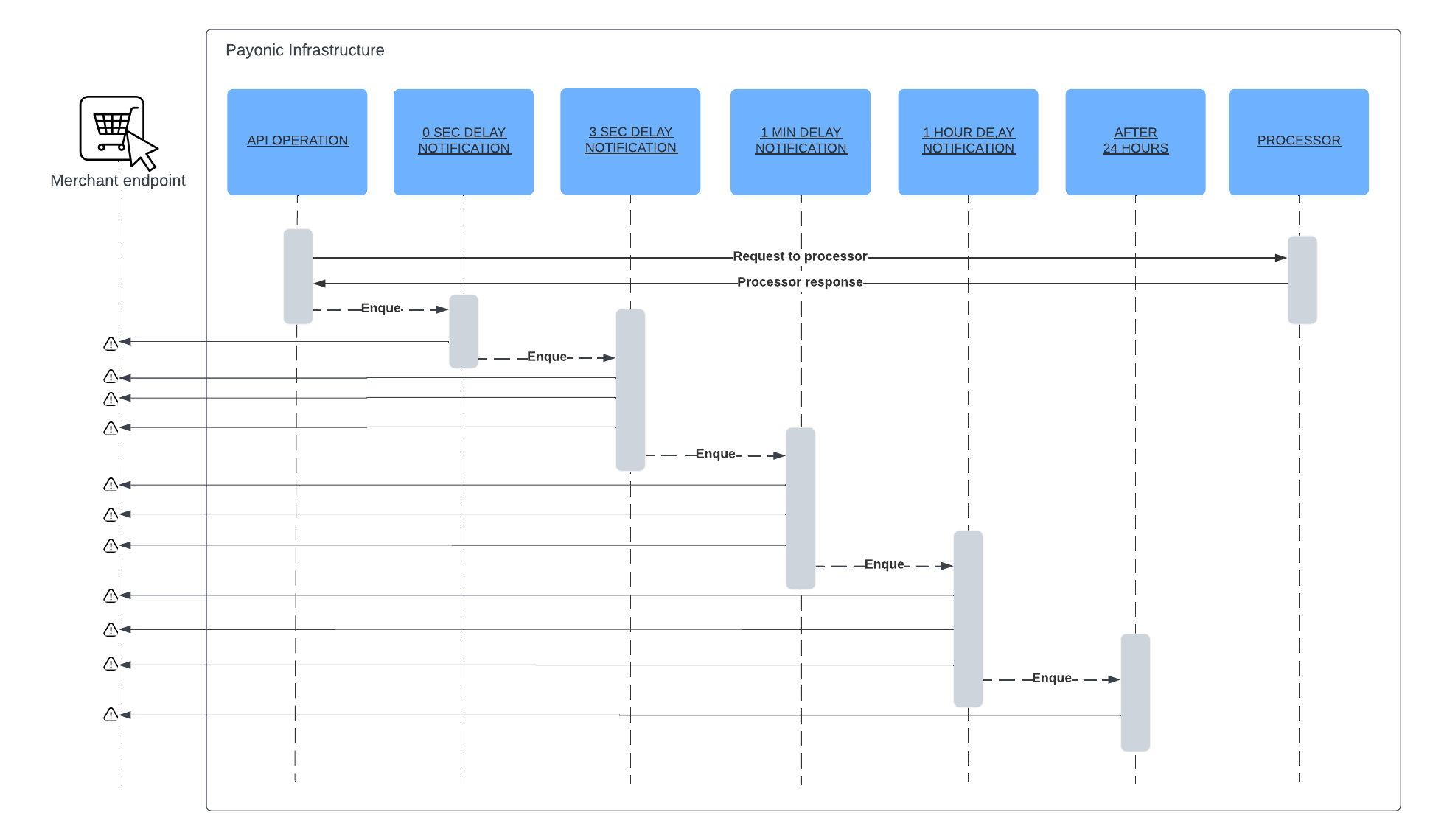
Timeout for each notification is defined by the table below.
| Delay | Notification Timeout |
|---|---|
| 0 sec delay | 5 seconds |
| 3 sec delay | 5 seconds |
| 1 min delay | 10 seconds |
| 1 hour delay | 15 seconds |
| 24 hour delay | 15 seconds |
System API declines
This section describes the overall error handling when the payment platform declines an inbound request.
When the payment platform declines the request it will return to the requester with HTTP status code 400 and include the following payload.
{
	"error": "INVALID_PARAMETER",
	"errordescription": "the parameter [amount] with value [100,00] does not support alphanumeric values",
}
- INVALID_API_KEY
- INVALID_MERCHANTID
- INVALID_PARAMETER